Introduction
Asus ROG Zephyrus G14 2026 model. This is a computer that I would say is probably one of the most versatile in the Asus lineup. Over the years, I’ve checked out computers from the VivoBook, ZenBook, ProArt, and Zephyrus lineups. And since checking out the Asus Zephyrus G14 last year, I’ve felt like it was the perfect middle ground. Great for creatives, video editors, photographers, but also a gaming computer that doesn’t lean too far into a gaming aesthetic. And I think ASUS has done a very good job of that because it’s a computer that has a great display, great hardware, build quality, a dedicated RTX GeForce graphics, and in this case, you’ve got the latest and greatest CPU as well, and plenty of different options depending on what you’re looking for.
Hardware Changes
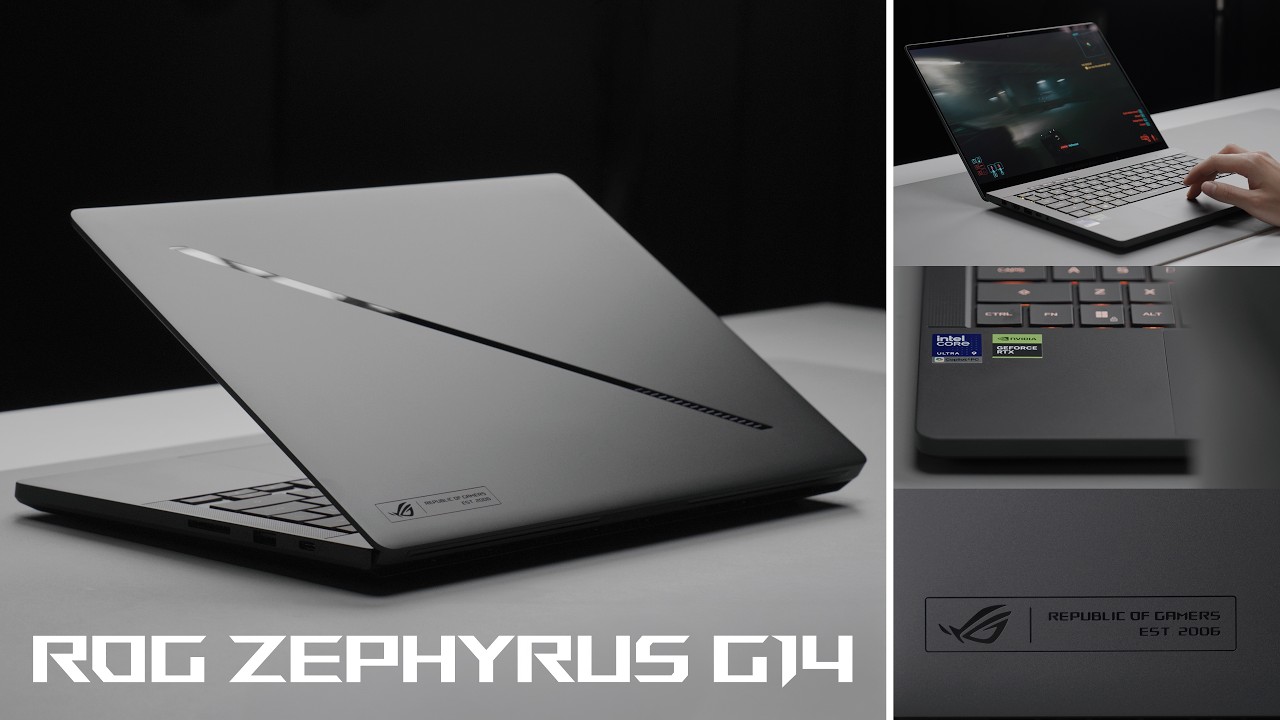
Asus ROG Zephyrus G14 2026 model Hardware Changes, which seems to be a pretty regular occurrence. But beyond some great updates in terms of performance, there are also some hardware subtle changes as well. The design was already incredible. I think it’s a very sharp-looking computer that again doesn’t look too gamer-like, but that is great for creatives and has some small touches as well, and can totally be used as a work computer. On the back here, you actually have 35 zones of the Slash compared to 7 in the previous generation. I have it in the Eclipse gray right here, but it’s also available in platinum white, which I really like in that sharp silver. But this, I would say, is like a midtone gray, and it hasn’t been as fingerprinted as I expected. Some of the other hardware improvements include changes to the hinge as well as the exhaust and intake. They’ve cleaned it up a little bit, made it more efficient, allowing it to circulate air a little bit better, ultimately reaching higher wattages and performance. And the CNC aluminum unibody is more durable. That results in less flex on the keyboard. That is very important for those who are using the keyboard to game and do a lot of typing. So, they’ve made a lot of different refinements that when you take a closer look, you’ll notice, but from a distance, it is still the same great design. The computer is still very thin and light. It weighs in at just 1.5 kg. And considering it has a dedicated GPU, I personally really prefer a 14in laptop size if there are very minimal compromises, if any. It comes in at just 1.59 cm at its thinnest point, is made out of 100% aluminum alloy, and it features a 12-stage manufacturing process to ensure the durability that is meant for the top of the line of hardware. This is really for those who are looking for a premium laptop in every dimension. I just love how thin and portable it is. And with the option of the Asus Zephyrus G14 or the G16, you can decide based on the screen size which option you’re going for, and also customize the specs.
Also Read: Laptop Buying Guide 2026 – Don’t Waste Your Money!
Display
Asus ROG Zephyrus G14 Display. Perhaps the biggest update by far, though, is the peak brightness of 00 nits up from 500. 500 is what we considered standard, what you see on a lot of computers out there. But at the pro level, laptops have, of course, been reaching over a 000 nits, namely the MacBook Pros, which are kind of like the gold standard a lot of times when it comes to having an incredible display on the laptop. And in this case, you reach 00 nits. It is a 14-in OLED panel with a 3K resolution, and it also has a 0.2 2 millisecond response time, 1 million to 1 contrast ratio, 100% DCIP3 color gamut, and on top of that, a 120 Hz refresh rate. But in this case, not only is it well-rounded across the board, but you also have Corning Gorilla Glass DXC, Nvidia G-Sync technology, and a very thin 87.3 screen-to-body ratio that goes all the way around. And I mean, this display is just beautiful. The extra brightness is definitely something that you notice. And it’s one of those changes where even if you say you don’t really care about all the other stuff, oh, like the specs, the hardware, a brighter display in many scenarios is something that makes a significant difference to the user experience.
Performance / Specifications
Asus ROG Zephyrus G14. When it comes to the processor, this one right here has the latest generation Intel Core Ultra 9 386H as well as an Nvidia GeForce RTX 5080 laptop GPU. So, this is like a very powerful combination. And I mean, some of the Intel Core Ultra 9 computers that I checked out with the built-in graphics had already been pretty impressive, but in this case, you have the best of both the CPU and the GPU, providing you with an incredible amount of power. And in fact, a lot of the chassis changes were to be able to incorporate that latest and greatest CPU while also ensuring it is able to run at a maximum reasonable portable power. You can go up to 64 GB of RAM, which has been made slightly faster. And when it comes to the internal storage, that is also another area where performance silently comes from. This features up to a 2-terabyte PCIe SSD that gets you speeds of up to 5,000 megabytes per second. With the new processor, the performance is something that I noticed a difference in from the previous generation. I’ve run my standard tests of Da Vinci Resolve, Photoshop, Lightroom, and usually Da Vinci Resolve is where I can really see a tangible difference between the different generations of computers, especially when it comes to high-resolution rendering, color grading, and exporting. And ultimately, this computer is able to run quite a bit nicer with the improved ROG intelligent cooling technologies that I mentioned.
ROG Intelligent Cooling
Asus ROG Zephyrus G14, when it comes to the hardware, how the computer breathes, how it pushes air away from the computer. It also features liquid metal, which is 14.6 times better at thermal conductivity, and it runs 13° lower compared to traditional thermal paste, while also including a tri-fan technology with air directed through the cutouts of the chassis, just improving the overall air flow of the computer. Instead of having two fans and one heat pipe, this generation has two fans and two heat pipes. This is especially important in the 14inch size, which typically has some trade-offs when it comes to its thermal features because of how contained everything is. I mean, at the end of the day, the SSD, the RAM, the processor, and the GPU are a standard size, whether you have a computer that is 14 in or extremely large. So, having to engineer it all within a 14-in frame comes with a lot of efficiency optimizations that allow it to get at its best performance possible. This computer also has a six-speaker setup with two woofers, and the trackpad itself is also a pretty good size, but I imagine a lot of gamers will be using an external mouse. So, when you take a look at this, I see a lot of the MacBook Pro in this setup, or like the Windows equivalent. A computer that is still very thin and light, but at the same time, you have dedicated graphics, the latest and greatest CPU, quite a bit of RAM, a solid battery, a beautiful display, and I mean, it is trying to check every single box for the ultimate gamer and performance-focused creator.
Also Read: STOP Buying Bad SSD! Best SSD for Gaming in 2026
IO / Connectivity
When it comes to the IO, it features a UHS2 full-size SD card reader, which is the same one that you find on the G16, as opposed to the micro SD in the previous generation. And that is a welcome change. You’ve got a Thunderbolt port, USBC. You’ve got an HDMI port, a DC port, as well as two USBAs, which a lot of computer mice still seem to use, and also a DC for power if you want to go ahead and plug it in and use it in a desktop setting or just to have it connected while you’re running at high performance. This generation also features Wi-Fi 7, which I think is huge for gamers out there. I know not everyone has a Wi-Fi 7 network, but in my case, I do have that. And very few devices are able to support and take advantage of that. And so, especially if you are gaming, streaming, or uploading large amounts of files, having the latest and greatest in Wi-Fi technology is a good bonus. In this case, I have the Intel Core Ultra 9 Panther Lake processor, but you also have options of different GPUs, CPUs, and even an AMD Ryzen AI 9465 processor option. So, it really depends on your preference between AMD and Intel, and specifically what you plan to do. Personally, I found that I had a different experience when it comes to both Intel CPUs and AMD ones. So, although both of them offer great performance, it really comes down to the weight of tasks that you plan to be doing and which processor is better tuned to that.
Battery
When it comes to the battery with these computers, it is very subjective. I feel like everyone gets a bit of a different experience depending on what you’re doing because there’s a whole range of tasks that this Asus Zephyrus G14 can be suited towards. And this computer features the same size battery as the previous generations at 73Wh. And when it comes to the charging speed, the DC gives you up to 250 watts, but the USB Type-C gives you 100 watts through PD, which I think is still pretty solid. And a lot of times, I just walk around with a USB-C battery pack that is suited for laptops and can keep this computer running while I’m running it at peak capability. If you’re doing things like photo editing, video editing, I would say you can expect about 3 and 1/2 to 4 hours of battery life. And if you’re gaming, probably around the same as well. But again, it depends on the settings that you have manually set and how you want to run the processor, the CPU, and allocate the performance, because the experience will vary. And these computers have many different modes, whether you are plugged in or running on battery, depending on how you want to regulate it. I would say for the most part, it’s one that you want to have plugged in. Being able to run it at the capability based on what you’ve spent on this computer is what makes the most sense at the end of the day. But having the versatility to charge with the DC and a fast USBC charger is still good to have, and it’s an option that I use all the time.
Outro
So, at the end of the day, how do I rank some of the changes to the new Asus ROG Zephris G14? I would say the 14-in model in particular saw the greatest updates. That is where you’re going to notice different performance increases, and that is not only from the actual change in the next-generation Intel chip but also in the thermal changes. The hardware saw very minimal differences, but perhaps the biggest one of all is the fact that the display is able to reach 1,000 nits in peak brightness. This is probably one of the most well-rounded computers that you can purchase. And if I were deciding between a ProArt computer or a Zephris, I personally would lean towards the Zephris. In some ways, I think it has a better design. I really like the color options that they have, but I also feel like the hardware optimizations and where gaming is often seen as like the gold standard of performance are going to give you tangible differences if you’re doing graphics and creative work as well. Other little touches, such as the LED strike, aren’t really a reason to go ahead and update, but if you’re coming from a generation from many years ago, then this is where you want to land. I feel like there aren’t many things that I don’t like about this computer. It does check a lot of the boxes that I felt like could have been improved on in the previous generation, while also making some optimizations that I maybe didn’t notice before.