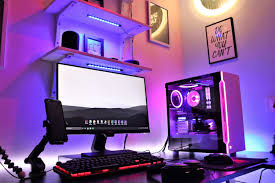
Introduction
I’ve spent a lot of time studying how pro gamers build their setups. One thing became very clear to me small gear choices can change how a player performs in matches.
A professional gaming setup is not about looking fancy. It’s about speed, comfort, and control. When I look at esports-level players, their equipment is always chosen with purpose.
In this guide, I’ll walk you through what I’ve learned about what gaming gear do pro gamers use and why each piece matters in real gameplay.
What You Will Learn in This Guide
Before diving into the full breakdown, I want to quickly show you what this guide actually covers. Think of it as a simple roadmap so you know exactly what to expect.
I’ve kept everything focused, practical, and based on real gaming setups so you can easily understand how pro gamers actually build their gear system.
Here’s what you will learn step by step:
- The real setup behind pro gamers and how their gear is structured for performance
- Why gaming mouse choice matters so much in fast-paced competitive gameplay
- How mechanical keyboards improve speed, response time, and overall control
- The role of gaming headsets in delivering clear, accurate competitive sound
- Why high-refresh-rate monitors help improve reaction speed and visibility
- How gaming chairs support long sessions without losing comfort or focus
- The key differences between PC and console setups in esports environments
- Why stable internet and low latency connections are critical for winning matches
- Extra gaming accessories that many players ignore but can still improve performance
- Whether beginners should copy pro-level setups or start with simpler gear first
By the end of this guide, you’ll have a clear understanding of how each part of a pro gaming setup works together and what actually matters when building your own setup.
What Makes a Pro Gaming Setup Different?
When I compare a casual gaming setup with a professional one, I notice a very clear difference in mindset and design approach. Casual players often focus on appearance or random upgrades, while professionals build their entire environment around one thing consistent performance under pressure.
A true pro setup is carefully optimized using gaming gear used by pro gamers that is tested for speed, accuracy, and long-term reliability. Every component is chosen with purpose, not just preference.
Professional players usually focus on a few core areas:
- High-response peripherals such as ultra-fast mice, mechanical keyboards, and precision headsets
- Stable performance hardware that ensures no lag, frame drops, or system instability during competition
- Comfortable long-use design that supports hours of practice without fatigue or strain
- Low-delay connections that reduce input lag and give instant reaction time advantages
This combination of pro gamer gaming setup design principles ensures that nothing interrupts focus or reaction speed during gameplay. Even small milliseconds of delay can decide outcomes in competitive esports, which is why everything is optimized for efficiency.
I also looked into official esports breakdowns from industry sources, including Intel’s gaming resources, and they consistently highlight one key idea: professional players prioritize speed, precision, and reliability over visual decoration or unnecessary features. That’s why professional gaming equipment is often simpler in design but much more powerful in performance.
In real competitive environments, every piece of esports gaming gear is selected to reduce friction between the player and the game. From monitors with high refresh rates to lightweight pro gaming accessories, everything is built to respond instantly and consistently.
In short, a pro gaming setup is not about looking impressive it’s about performing at the highest level with zero distractions and maximum control.
When I test different gaming gear, the mouse is always the first thing I focus on because it directly affects reaction speed, aim stability, and overall control in any game.
From my experience, especially when comparing gaming gear used by pro gamers, the difference becomes obvious very quickly. A professional-level mouse is not just about design it’s about precision under pressure.
Most pro players and competitive setups usually prefer:
- Lightweight design for faster flick movements
- High DPI accuracy for better sensitivity control
- Ultra-low response time for instant input
- Reliable sensor tracking to avoid jitter or delay
This is exactly why a pro gamer gaming setup always starts with a high-performance mouse. In esports environments, even a few milliseconds of delay can change the outcome of a match, which is why professional gaming equipment is carefully chosen and tested before use.
Today’s esports gaming gear has also evolved a lot. Wireless gaming mice are becoming more popular because modern technology has reduced latency significantly. Still, many competitive players stick with wired mice because they trust the consistent, zero-delay performance during intense matches.
I once switched between a budget mouse and a pro-level mouse while playing the same game. The feeling was completely different almost like switching from regular sneakers to roller skates. Both move you forward, but one reacts instantly while the other feels slightly delayed.
That small difference is exactly what separates casual play from competitive performance, and it’s also why pro gaming accessories like a high-quality mouse are considered essential rather than optional in serious setups.
Mechanical Keyboards: Speed in Every Press
A mechanical keyboard is almost standard in competitive setups.
Why?
- Faster key response
- Better durability
- Clear tactile feedback
Different switches matter too:
- Red switches → fast and smooth
- Blue switches → clicky and loud
- Brown switches → balanced feel
If you want to understand how gear choices affect performance, I also found useful comparisons in guides like esports gear breakdown.
Headsets: Hearing Every Detail
Sound is not just background in gaming it is information.
Pro players rely on headsets for:
- Footstep detection
- Directional sound awareness
- Team communication clarity
Noise isolation is important too. I personally noticed that even small background sounds can break focus during competitive matches.
Monitors: Reaction Speed Matters
One thing I learned quickly while exploring competitive setups is that display speed matters more than raw resolution when it comes to esports performance. In fast-paced games, every millisecond counts, and that’s exactly why the gaming gear used by pro gamers is so focused on speed and responsiveness instead of just visual quality.
Most gear used by esports players is carefully selected to reduce delay and improve reaction time. That’s also a big reason why the best gaming gear for competitive gaming always prioritizes performance features like refresh rate, input lag, and response time over flashy design.
Pro gamers usually prefer monitors with:
- 144Hz, 240Hz, or even higher refresh rates
- Extremely low input lag
- Fast response time panels (1ms or similar)
Higher refresh rates make motion feel smoother and more natural, which gives a real advantage in tracking enemies and reacting instantly. This is a core part of gaming peripherals used by pros, especially in FPS and battle royale titles.
When I looked deeper into setups, I also noticed how balanced everything is in a pro gamer monitor setup. It’s not just the monitor everything connects with performance in mind, from the GPU to the cables and even desk positioning.
Alongside displays, players also care about other equipment like pro gamer PC accessories, because every small delay or inefficiency can affect gameplay at a high level.
People often ask questions like:
- what headset do pro gamers use
- what mouse do pro gamers use
- what keyboard do pro gamers use
And the answer usually depends on personal preference, but all of them share one goal: maximum responsiveness, comfort during long sessions, and consistency under pressure.
In the end, competitive gaming isn’t just about skill it’s also about having the right setup where every component works together to reduce lag and improve reaction speed.
Gaming Chairs: Comfort Over Hours
I used to ignore chairs until I experienced long gaming sessions.
A proper chair helps with:
- Posture support
- Back strain reduction
- Long-term comfort
Adjustable armrests and lumbar support are common in pro setups. Without comfort, even the best player gets tired faster.
PC vs Console Setup Choices
Pro gamers usually use high-performance PCs, but consoles still appear in certain esports scenes.
Gaming PCs offer:
- Custom performance tuning
- Higher frame rates
- Upgrade flexibility
Consoles offer:
- Stability
- Simple setup
- Lower cost entry
It depends on the game type and competition level.
Internet Stability: The Invisible Advantage
A strong setup is useless with unstable internet.
Pro gamers often use:
- Wired Ethernet connections
- Low-latency routers
- Stable bandwidth settings
Even a small lag spike can change match outcomes. I’ve seen players lose rounds just because of network delay.
Extra Gaming Accessories That Matter
Some small tools often get ignored but still make a difference:
- Large mouse pads for smooth movement
- Custom controller layouts
- Webcam and mic for streaming
- Simple RGB lighting for focus
These are not required, but they improve the overall experience.
Budget vs Pro Gear: Do You Need Everything?
I often get this question: should beginners copy pro setups?
My answer is simple—no.
Start with:
- A decent mouse
- Comfortable keyboard
- Stable internet
Upgrade slowly. Performance matters more than expensive branding.
For example, if you’re also exploring tech choices like mobile setups, you might find my thoughts on mid-range Android phones helpful for understanding value-based tech decisions.
Beginner Advice I Always Share
If you are building your first setup, I suggest:
- Focus on comfort first
- Avoid buying everything at once
- Upgrade based on need, not hype
- Test gear before final choice when possible
Small improvements matter more than expensive full setups.
FAQs
What gaming gear do pro gamers use most?
They mainly rely on high-speed mouse, mechanical keyboard, low-latency monitor, and stable internet.
Do pro gamers use wireless gear?
Yes, but only high-quality wireless devices with low delay.
Is expensive gear required for better performance?
Not always. Skill matters more than price.
Can beginners use pro-level gear?
Yes, but it’s better to start simple and upgrade step by step.
Conclusion
When I look back at everything, I realize that what gaming gear used by pro gamers comes down to is not luxury, but performance-focused design. Every detail matters in competitive play.
Whether it’s gear used by esports players, understanding what headset do pro gamers use, what mouse do pro gamers use, or what keyboard do pro gamers use, the pattern is always the same speed, precision, and reliability.
A complete pro gamer monitor setup combined with optimized pro gamer PC accessories and carefully selected peripherals is what truly defines the best gaming gear for competitive gaming. If you build your setup with intention instead of hype, you’ll already be ahead of most players.