

What is aperture in photography? Aperture is the opening inside your camera lens that lets light enter the camera. It also controls how much of your photo looks sharp and how much of the background looks soft and blurry.
When I first started taking photos, aperture confused me a lot. I thought a bigger number meant a bigger opening. Then I used f/16 indoors and wondered why my photo looked so dark. Later, I learned the simple rule: low f-number means wide aperture, and high f-number means small aperture.
Once you understand aperture, your photos start to look more planned. You can make portraits look dreamy, landscapes look sharp, and low-light photos look brighter.
What You Will Learn
- Aperture definition in photography
- Aperture meaning in photography for beginners
- How f-stop works
- How aperture affects background blur
- Best aperture settings for different photos
- Common mistakes to avoid
- 7 easy tips to master aperture
What Is Aperture in Photography?
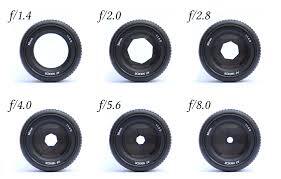
Aperture is one of the main camera settings, along with shutter speed and ISO. It controls how much light passes through your lens and reaches the camera sensor.
Think of it like your eye pupil. In a dark room, your pupil gets bigger to take in more light. In bright sunlight, it gets smaller. A camera lens works in a similar way.
Simple Aperture Definition in Photography
The simple aperture definition in photography is: aperture is the opening in a camera lens that allows light to enter the camera.
A wide aperture lets in more light. A small aperture lets in less light.
For example, if you are taking photos indoors, you may use f/1.8 or f/2.8. These settings help brighten the photo. If you are outside on a sunny day, f/8 or f/11 may work better.
Aperture Meaning in Photography for Beginners
The aperture meaning in photography is not only about light. It also controls the creative look of your image.
Aperture affects:
- Brightness
- Background blur
- Depth of field
- Image sharpness
For example, if you take a photo of a person at f/1.8, the person may look sharp and the background may look blurry. If you take the same photo at f/11, both the person and background may look sharper.
Same subject. Same place. Different aperture. Very different result.
How Does Aperture Work in Photography?
Aperture works by changing the size of the lens opening. This size is shown by f-stop numbers, such as f/1.8, f/4, f/8, or f/16.
Here is the part beginners often find strange:
Small f-number = big opening.
Big f-number = small opening.
So, f/1.8 is wider than f/16.
Large Aperture vs Small Aperture
A large aperture lets in more light and creates more background blur. A small aperture lets in less light and keeps more of the scene sharp.
| Aperture | Light | Background | Best For |
| f/1.8 | More light | More blur | Portraits, low light |
| f/5.6 | Medium light | Balanced | Street, casual photos |
| f/11 | Less light | More sharpness | Landscapes |
| f/16 | Very little light | Deep focus | Architecture, sun stars |
A wide aperture is great when you want your subject to stand out. A small aperture is better when you want more details in the whole frame.
What Is F-Stop in Aperture?

F-stop is the number used to measure aperture. You will see it written as f/1.4, f/2.8, f/5.6, f/8, f/11, and so on.
Why Smaller F-Number Means Bigger Aperture
This can feel backward at first. But remember this simple line:
Low f-number = big opening. High f-number = small opening.
So, f/2 lets in more light than f/8. It also gives more background blur.
When I was learning, I used to remember it like this: “Small number, big blur.” Simple, but it works.
Common Aperture Scale
Common aperture values include:
f/1.4, f/2, f/2.8, f/4, f/5.6, f/8, f/11, f/16, f/22
Each full stop changes the light by double or half. For example, moving from f/4 to f/2.8 lets in twice as much light. Moving from f/4 to f/5.6 cuts the light in half.
You do not need to memorize all the math. Just understand that aperture changes both brightness and background blur.
Aperture and Depth of Field
Depth of field means how much of your photo looks sharp from front to back.
A shallow depth of field means only a small part of the image is sharp. This is great for portraits, flowers, food, and product photos.
A deep depth of field means more of the image is sharp. This is useful for landscapes, group photos, and architecture.
What Is Depth of Field?
Depth of field is the sharp area in your image.
For example, imagine you take a photo of a coffee cup. At f/1.8, the cup may look sharp and the background may look soft. At f/11, the cup, table, and background may all look clearer.
Both can be good. It depends on what you want to show.
How Aperture Changes Background Blur
Wide aperture settings like f/1.8 or f/2.8 create more blur. This blur is often called bokeh.
Small aperture settings like f/8 or f/11 keep more things in focus.
A useful photo example for your blog would be:
Same subject at f/1.8 with blurry background
Same subject at f/11 with sharp background
This kind of image helps beginners understand aperture fast.
Other Things That Affect Depth of Field
Aperture is important, but it is not the only thing that affects blur.
Other factors include:
Distance between camera and subject
Distance between subject and background
Lens focal length
Sensor size
If your subject is far from the background, the blur will look stronger. If your subject stands right against a wall, even f/1.8 may not create much blur.
Aperture and Exposure Triangle
Aperture is part of the exposure triangle. The other two parts are shutter speed and ISO.
These three settings work together to control brightness.
Aperture controls lens opening
Shutter speed controls how long light enters
ISO controls camera sensitivity to light
Aperture vs Shutter Speed
A wide aperture lets in more light. So, you can use a faster shutter speed.
This helps when shooting moving people, pets, or sports. If the shutter speed is too slow, your photo may look shaky or blurry.
A small aperture lets in less light. So, the camera may need a slower shutter speed. That can work for landscapes with a tripod, but not for moving subjects.
Aperture vs ISO
ISO brightens your photo, but high ISO can add noise.
When you use a wide aperture in low light, you can keep ISO lower. This gives a cleaner photo.
For example, indoors, f/1.8 can help you avoid using very high ISO.
Easy Exposure Example
| Situation | Aperture | Best Use |
| Portrait | f/2.8 | Blurry background |
| Landscape | f/11 | More sharpness |
| Indoor photo | f/1.8 | More light |
| Street photo | f/5.6 | Balanced focus |
These are starting points. You can adjust based on light and style.
Best Aperture Settings for Different Photography Types
There is no one perfect aperture for every photo. Best place depends on your subject.
Best Aperture for Portrait Photography.
For portraits, try f/1.8 to f/2.8. This gives a soft background and helps your subject stand out. But focus carefully, especially on the eyes. At f/1.8, even a small focus mistake can make the face look soft.
Best Aperture for Landscape Photography
For landscapes, try f/8 to f/11.
This will keep more of the scene in focus. It works well for mountains, beaches, city views and travel photos.
Best Aperture for Street Photography
For street photography, try f/5.6 to f/8.
This gives enough depth of field for quick moments. You may not have time to focus perfectly, so a medium aperture gives you a safer result.
Best Aperture for Product Photography
For product photos, try f/8 to f/11.
This keeps the product details sharp. If you are shooting for a shop or website, sharpness matters more than fancy blur.
Best Aperture for Macro Photography
For macro photography, try f/8 to f/16.
Macro photos have very shallow depth of field. Even small subjects can look partly blurry. A smaller aperture helps keep more detail sharp.
Best Aperture for Low-Light Photography
For low light, try f/1.4 to f/2.8.
A wide aperture lets in more light. This helps you use a faster shutter speed and lower ISO.
Aperture and Bokeh
Bokeh means the soft blur in the out-of-focus parts of a photo. It is common in portraits, food photos, and close-up shots.
What Is Bokeh?
Bokeh is the quality of background blur. A wide aperture helps create stronger bokeh.
For example, if you take a portrait at night with lights in the background, those lights may turn into soft circles. That look comes from shallow depth of field and lens design.
How to Get Better Bokeh
To get better bokeh:
Use f/1.8 or f/2.8
Keep your subject far from the background
Move closer to your subject
Use a longer lens
Focus on the eyes for portraits
This is one of the easiest ways to make simple photos look more professional.
Aperture and Image Sharpness
Many beginners think the widest aperture is always best. I thought that too. But after checking my photos closely, I noticed some were not very sharp.
Is the Widest Aperture Always Best?
No. A wide aperture gives more light and blur, but it may not always give the sharpest image.
Some lenses look a little soft at their widest aperture. For sharper results, try stopping down a little. For example, if your lens opens to f/1.8, try f/2.8 or f/4.
Many lenses are very sharp around f/5.6 to f/8.
What Is Diffraction?
Diffraction can happen when you use a very small aperture like f/16 or f/22. The photo may become less sharp because light spreads through the tiny opening.
You do not need to avoid f/16 forever. Just do not use f/22 for every photo. For many landscapes, f/8 or f/11 is enough.
How to Change Aperture on Your Camera
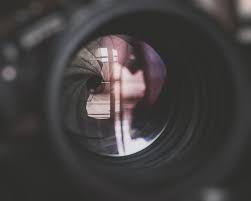
Changing aperture depends on your camera, but the idea is simple. You choose the f-number.
Aperture Priority Mode
Aperture Priority is great for beginners.
On Canon cameras, it is called Av mode.
On Nikon, Sony, and Fujifilm cameras, it is usually called A mode.
You choose the aperture, and the camera sets the shutter speed.
Manual Mode
In Manual Mode, you control aperture, shutter speed, and ISO yourself.
This gives full control, but it takes practice. I suggest starting with Aperture Priority first. Then move to Manual Mode when you feel ready.
Phone Camera Aperture
Most phone cameras have a fixed physical aperture. You usually cannot change it like a DSLR or mirrorless camera.
Phone Portrait Mode creates background blur using software. It can look good, but sometimes it makes mistakes around hair, glasses, or edges.
How to Choose the Right Aperture
Ask yourself one question:
Do I want more blur or more sharpness?
If you want background blur, use a low f-number.
If you want a sharper scene, use a higher f-number.
Goal Choose
Blurry background f/1.8–f/2.8
One person portrait f/2–f/4
Group photo f/5.6–f/8
Landscape f/8–f/11
Low light f/1.4–f/2.8
Product photo f/8–f/11
When I am unsure, I take two test photos. One with a wide aperture and one with a smaller aperture. Then I zoom in and check the result.
7 Easy Tips to Master Aperture in Photography
1. Remember the Simple Rule
Small f-number means big opening. Big f-number means small opening.
This one rule clears most confusion.
2. Use f/1.8–f/2.8 for Portraits
This gives nice background blur and makes the subject stand out.
3. Use f/8–f/11 for Landscapes
This keeps more of the scene sharp and detailed.
4. Watch Your Shutter Speed
Small aperture lets in less light. Your shutter speed may become slow and cause blur.
5. Keep ISO as Low as Possible
A wide aperture helps you keep ISO lower in dark places. This keeps photos cleaner.
6. Don’t Always Use f/22
f/22 may reduce sharpness. Use f/8 or f/11 first.
7. Practice With One Subject
Take the same photo at f/1.8, f/4, f/8, and f/16. Compare the background and sharpness. This simple test teaches a lot.
Common Aperture Mistakes Beginners Make
Using Wide Aperture for Group Photos
f/1.8 may work for one person, but not always for groups. Some faces may look blurry. Use f/5.6 or f/8 for group photos.
Using Small Aperture in Low Light Without a Tripod
If you use f/11 indoors, your shutter speed may become too slow. This can cause camera shake. Open the aperture or use a tripod.
Thinking Aperture Only Controls Brightness
Aperture controls light, but it also controls depth of field and background blur. This is why it is such a powerful camera setting.
Quick Aperture Cheat Sheet
Goal: Use This Aperture
Blurry background f/1.8–f/2.8
Everyday photos f/4–f/5.6
Group photos f/5.6–f/8
Landscap f/8–f/11
Starburst effect f/16
Low light f/1.4–f/2.8
Product photos f/8–f/11
Macro photos f/8–f/16
FAQs About Aperture in Photography
What is aperture in photography?
Aperture is the opening inside a camera lens that lets light reach the sensor. It controls photo brightness and depth of field. A wide aperture gives more light and blur, while a small aperture keeps more of the photo sharp.
What is the simple definition of aperture in photography?
To define aperture in photography simply, it is the lens opening that controls how much light enters the camera. It works like the pupil of your eye. A bigger opening lets in more light, and a smaller opening lets in less light.
What does aperture mean in photography?
Aperture means control over light and focus style. It helps decide whether the background looks blurry or sharp. It also affects how bright your photo looks. That is why aperture is both technical and creative.
Is aperture the same as f-stop?
Aperture and f-stop are related, but not exactly the same. Aperture is the physical opening in the lens. F-stop is the number used to measure that opening, such as f/2.8, f/5.6, or f/11.
Conclusion about Aperture in Photography
Aperture can appear tricky to begin with, but soon gets easier through practice. Light control, background blurriness, focus range, and clarity can all be controlled by aperture.
To begin, simply use the easy formula: low aperture value for lots of light and blurriness, while a high value is needed for clarity.
Next, practice taking pictures with just one object using apertures at f/2.8, f/5.6, and f/11. Notice how much difference the background and sharpness make.
By doing this, you’ll learn more about the concept of aperture, which in turn makes your photos more purposeful. This is what learning About aperture in photography really means.



One thought on “What Is Aperture in Photography? 7 Simple Tips to Master It Like a Pro”