

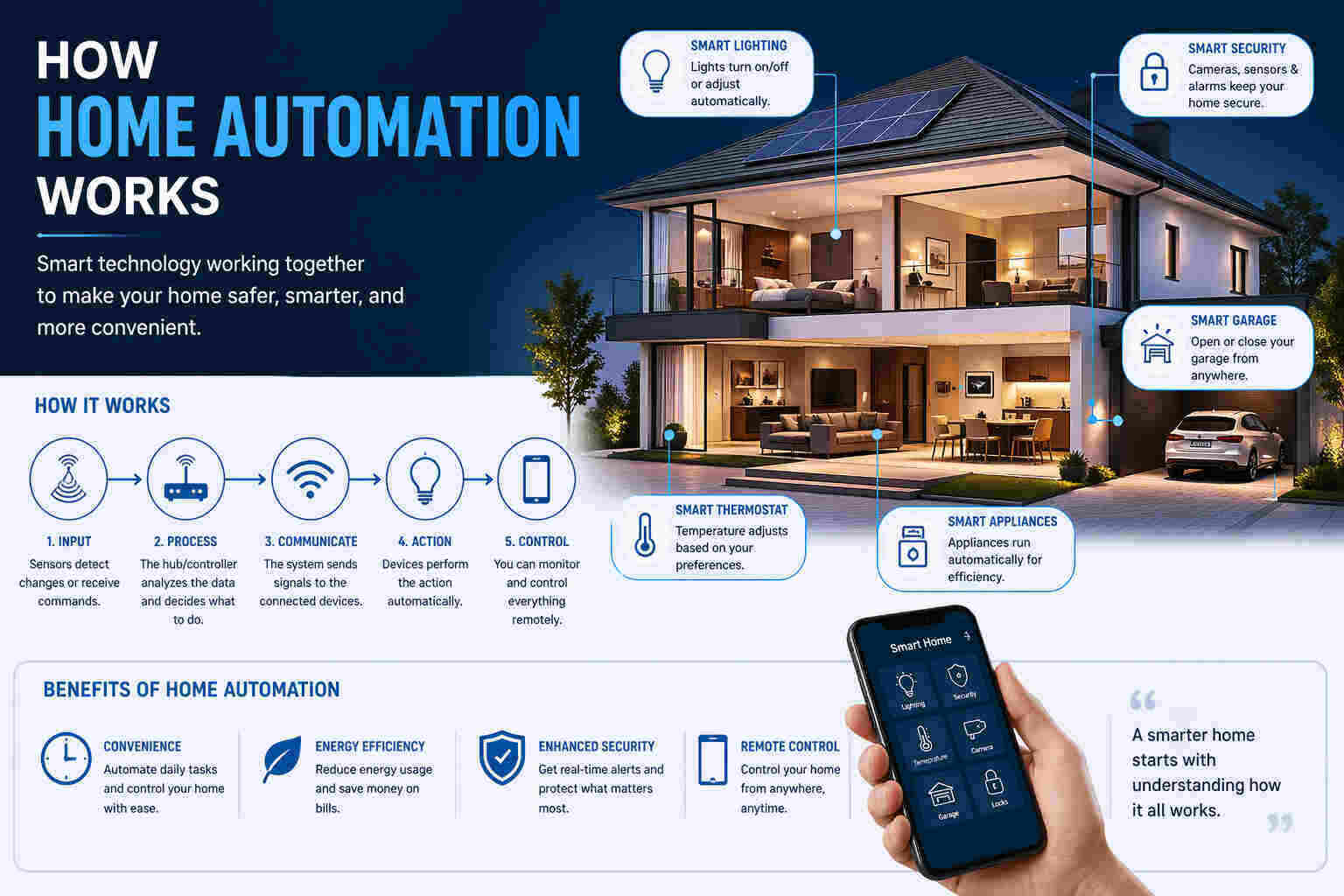
I’ve tested, compared, and worked with smart home setups for years, and one thing is clear: the right devices save time, reduce effort, and quietly handle tasks in the background.
In 2026, things feel more connected. Devices talk to each other better. Setup is simpler. And yes, fewer “why isn’t this working?” moments.
Here’s what I’ll cover in The Best Smart Home Devices of 2026, so you can move fast:
- The categories that actually matter
- My picks across essential device types
- What makes a device worth buying
- Real use cases (not theory)
- Mistakes I see people make
- How I build a setup without wasting money
What I Mean by “The Best Smart Home Devices of 2026”
When I say “best,” I don’t mean the most expensive or the newest release.
I look at:
- How easy it is to use daily
- How well it connects with other devices
- Whether it solves a real problem
- Long-term reliability
A device that works every day without friction beats a feature-heavy gadget that needs constant fixing.
Quick Breakdown: Device Categories That Matter
If I were starting from scratch, I’d focus on these first:
- Smart speakers and displays
- Smart lighting
- Smart security (cameras, locks, doorbells)
- Smart thermostats
- Smart plugs
- Cleaning automation (robot vacuums)
Everything else comes later.
How I Choose Smart Devices (My Practical Criteria)
I don’t pick devices randomly. I follow a simple filter.
1. Compatibility First
If a device doesn’t work with your ecosystem, it’s a headache waiting to happen.
I usually check support for:
- Alexa
- Google Home
- Apple HomeKit
If you’re unsure where to start, I break this down more in my guide on
smart home automation devices for beginners
2. Setup Should Be Simple
If setup takes more than 15–20 minutes, most people won’t use it properly.
3. Automation Potential
Good devices don’t just respond. They act on their own.
Example:
- Lights turn on when you enter
- Thermostat adjusts when you leave
4. Daily Use Value
If I don’t use it daily, I don’t recommend it.
The Best Smart Home Devices of 2026 (My Picks by Category)
Now I’ll walk through the categories that actually make a difference.
1. Smart Speakers and Displays
This is where I usually start.
They act as the control center for everything else.
My Take
Devices like Google Nest Hub Max stand out because of strong voice control and better understanding of natural commands.
In testing data, voice assistants like Google’s handled over 90% of complex queries correctly. That matters when you’re giving multi-step commands.
Where It Helps
- Controlling devices hands-free
- Managing routines
- Viewing camera feeds
When I Recommend It
If you want control without opening apps every time.
2. Smart Lighting Systems
Lighting is one of the easiest upgrades with immediate results.
What I Notice
- You stop touching switches
- Rooms feel more dynamic
- Energy use becomes visible
Real Use Case
I set lights to:
- Turn on at sunset
- Dim at night
- Turn off automatically when no one’s home
No extra effort. It just works.
3. Smart Security Devices
This includes:
- Cameras
- Doorbells
- Smart locks
Why I Rate This High
Security is one of the few areas where smart devices add real peace of mind.
What Works Best
- Motion alerts
- Remote access
- Live video
Some platforms even integrate with professional monitoring systems like ADT.
4. Smart Thermostats
This is where automation meets savings.
What I See in Real Use
- Temperature adjusts based on routine
- Less manual control
- Lower energy bills over time
Some systems claim up to 20–30% energy savings when used correctly.
My Rule
If you forget to adjust temperature often, this device pays for itself.
5. Smart Plugs (Best Entry-Level Option)
This is where I tell beginners to start.
Why
- Cheap
- Easy to install
- Immediate results
What You Can Do
- Turn devices on/off remotely
- Schedule appliances
- Automate basic routines
If you’re just getting started, I explain this more in my guide on
Amazon Alexa smart home devices
6. Smart Locks
This is convenience you notice every day.
What Changes
- No keys
- Remote access
- Temporary guest access
Honest Note
You’ll still double-check the lock the first week. After that, you trust it.
7. Video Doorbells
Simple upgrade. Big impact.
Why I Recommend It
- See who’s at the door anytime
- Get alerts instantly
- Record activity
It’s one of those devices you don’t think about until you need it.
8. Robot Vacuums
This is where automation feels real.
What I Like
- Scheduled cleaning
- Minimal effort
- Works in the background
Reality Check
It won’t replace deep cleaning. But it reduces how often you need to do it.
Smart Home Platforms That Power These Devices
Devices don’t work alone. They rely on platforms.
From testing and data:
- Google Home → Best voice accuracy
- Alexa → Works with the most devices
- Apple HomeKit → Strong privacy
- Matter → Future compatibility
- Home Assistant → Full control (for advanced users)
Each platform acts like an operating system for your home.
If you mix devices without a plan, things break. I’ve seen it too many times.
Best Smart Home Devices by Use Case
Not everyone needs everything.
Here’s how I break it down.
For Beginners
Start simple:
- Smart plug
- Smart speaker
That’s enough to learn how automation works.
For Security
Focus on:
- Cameras
- Smart locks
- Doorbells
For Energy Savings
Go with:
- Thermostats
- Smart lighting
For Full Automation
You’ll need:
- A central hub
- Integrated devices
Smart Home Trends I’m Seeing in 2026
Things are shifting in a good way.
1. Matter Is Expanding
Devices now work across platforms more easily.
This reduces compatibility issues.
2. More Local Control
Some systems process commands locally instead of using cloud servers.
Result:
- Faster response
- Better privacy
3. AI Is Improving Automation
Devices now understand context better.
You don’t need perfect commands anymore.
Pros and Cons (My Honest Take)
What Works Well
- Saves time daily
- Improves comfort
- Adds security
- Reduces manual effort
What Still Needs Work
- Setup can be confusing at first
- Some devices don’t integrate well
- Privacy concerns still exist
Common Mistakes I See People Make
I’ve seen these too often.
1. Buying Too Many Devices at Once
Start small. Expand later.
2. Mixing Ecosystems Without a Plan
This leads to compatibility issues.
If you’re unsure, check my breakdown of
Home compatible devices
3. Ignoring Automation
Most people use devices manually.
That defeats the purpose.
4. Choosing Price Over Compatibility
Cheap devices that don’t connect well cost more in the long run.
How I Build a Smart Home Setup (Simple Approach)
This is the process I follow.
- Start with a platform
- Add 1–2 core devices
- Test daily use
- Expand gradually
If you’re in the Apple ecosystem, I explain options here:
HomeKit smart devices
FAQs
1. Are smart home devices worth it in 2026?
Ans : Yes, if you use automation. Otherwise, they’re just remote controls.
2. Can I use multiple platforms?
Ans : Yes, especially with Matter support. But I keep one as the main system.
3. What’s the best device to start with?
Ans : Smart plugs or speakers. Low cost, high value.
4. Do these devices save energy?
Ans : They can, especially thermostats and lighting systems.
Final Thoughts
I don’t look at smart devices as upgrades. I see them as tools.
The right setup removes small daily tasks. That’s where the value is.
If you start simple and choose compatible devices, everything else becomes easier.
And if something doesn’t work the first time…
welcome to smart homes. It happens.


One thought on “The Best Smart Home Devices of 2026”