My Complete Voice Assistant Devices Guide for Building a Smarter Home 2026
When I first started exploring smart home technology, I assumed every device would work smoothly with voice commands right out of the box. That expectation disappeared quickly after dealing with connection issues, delayed responses, and devices that refused to cooperate with each other. That experience is one of the main reasons I decided to create this detailed voice assistant devices guide.
Over the years, I’ve learned that building a reliable voice-controlled smart home is less about buying expensive gadgets and more about understanding compatibility, setup, and ecosystem planning. A well-structured system can make daily routines easier, improve energy efficiency, and reduce the small frustrations that come from managing multiple devices manually.
In this voice assistant devices guide, I’ll explain:
- How voice assistant systems work
- The differences between major voice platforms
- Which smart devices are worth prioritizing
- Common compatibility mistakes
- Setup methods that improve reliability
- Automation ideas that genuinely help in daily life
- Troubleshooting steps for common issues
My goal is to keep this practical, easy to follow, and useful for both beginners and experienced smart home users.
Why This Voice Assistant Devices Guide Matters for Smart Home Planning
Many people buy smart devices individually without thinking about how those products will work together later. I’ve seen homes filled with smart bulbs, plugs, speakers, and sensors that technically function, but create constant frustration because the ecosystem was never planned properly.
A good smart home should feel simple. You should not have to open five different apps just to adjust lighting or manage your thermostat.
That’s why this voice assistant devices guide focuses heavily on compatibility and long-term stability rather than chasing every new smart gadget on the market.
A properly configured setup gives you:
- Faster voice response
- Better automation reliability
- Easier daily control
- Improved accessibility
- More stable device communication
Even small improvements can make a noticeable difference over time.
Understanding How Voice Assistant Devices Work
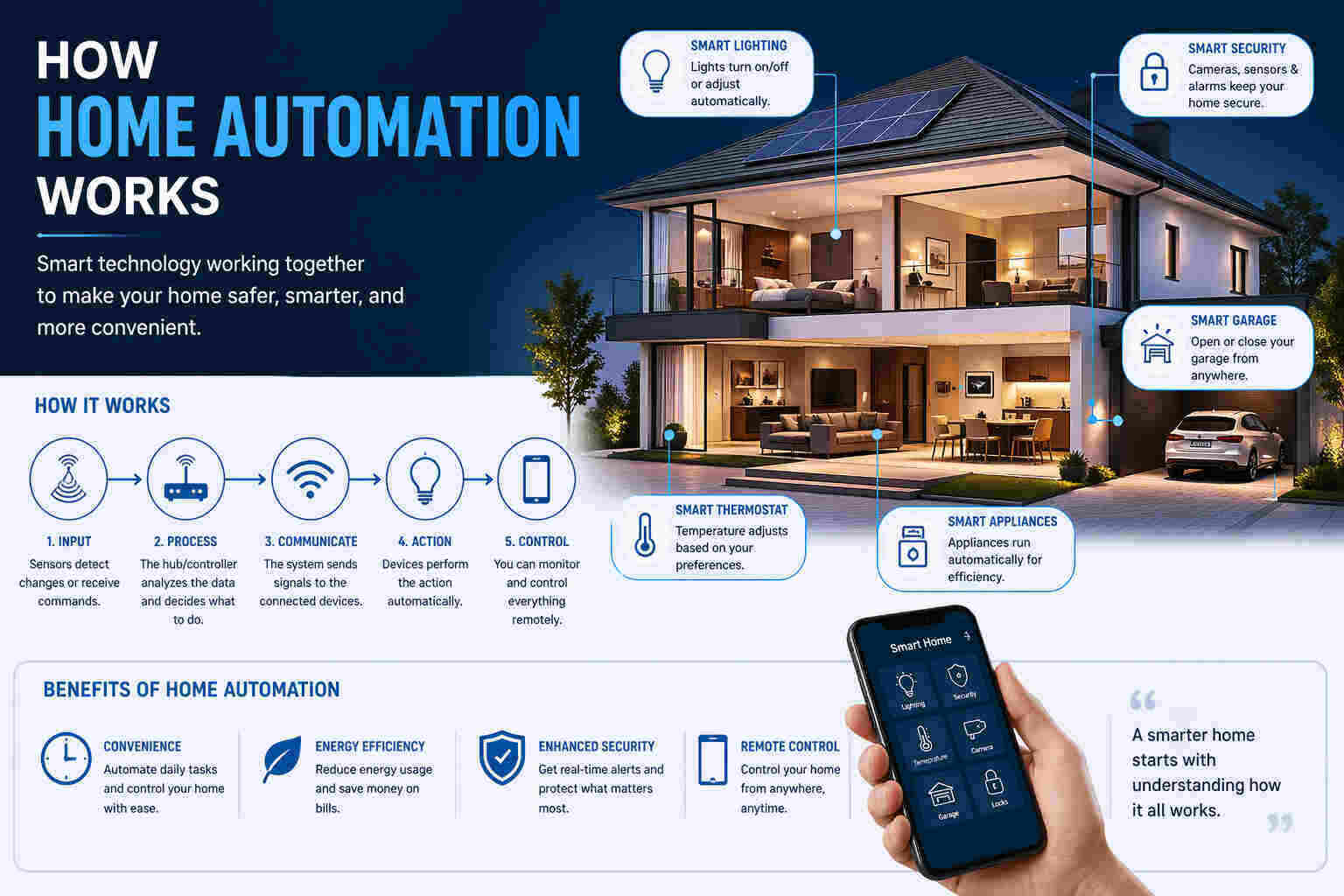
Voice assistant devices act as communication bridges between you and your smart home products. Instead of manually controlling switches or apps, you use natural speech commands.
For example:
- “Turn off the bedroom lights”
- “Set temperature to 22 degrees”
- “Lock the front door”
- “Play music in the living room”
Behind those simple requests, several processes happen almost instantly.
Voice Processing Steps
1. Voice Detection
Your smart speaker or assistant listens for a wake phrase like:
- “Alexa”
- “Hey Google”
- “Hey Siri”
2. Speech Interpretation
The assistant converts spoken language into digital text.
3. Command Analysis
The system determines what action should happen.
4. Device Communication
Instructions are sent to connected devices using:
- Wi-Fi
- Zigbee
- Z-Wave
- Matter
5. Device Execution
The smart device performs the requested action.
Understanding this process is important because many smart home issues happen during the communication stage rather than the voice recognition stage.
Major Voice Assistant Ecosystems Explained
One thing I’ve learned while creating this voice assistant devices guide is that ecosystem selection affects almost every future smart home decision you make.
Amazon Alexa
Alexa remains one of the most flexible smart home ecosystems available today.
Strengths
- Huge compatibility range
- Strong automation support
- Budget-friendly devices
- Easy setup process
Best For
- Beginners
- Mixed-brand smart homes
- Users wanting broad compatibility
Alexa works especially well for homes using multiple smart device brands together.
Google Assistant
Google Assistant focuses heavily on conversational intelligence and search integration.
Strengths
- Excellent voice recognition
- Strong Android integration
- Accurate responses
- Smooth smart home controls
Best For
- Android users
- Google ecosystem households
- Users wanting natural conversations
I’ve personally found Google Assistant very effective for complex voice requests and multi-step commands.
Apple Siri and HomeKit
Apple’s smart home ecosystem prioritizes security and privacy.
Strengths
- Strong encryption
- Stable performance
- Privacy-focused system
- Premium ecosystem quality
Limitations
- Smaller compatibility range
- Higher device pricing
Best For
- Apple users
- Privacy-focused households
- Premium smart home setups
HomeKit devices often cost more, but they usually provide strong stability once configured correctly.
Choosing the Right Devices for Your Smart Home
A reliable voice assistant devices guide should always emphasize compatibility before pricing.
Many users focus entirely on product features while ignoring whether devices integrate properly with their existing ecosystem.
What I Check Before Buying Smart Devices
Ecosystem Support
Always confirm compatibility with:
- Alexa
- Google Assistant
- Apple HomeKit
Communication Protocols
Look for support for:
- Zigbee
- Z-Wave
- Matter
These protocols generally improve reliability and long-term flexibility.
Firmware Support
Good manufacturers regularly release updates that improve:
- Stability
- Security
- Voice command accuracy
Real User Feedback
I pay more attention to long-term reliability reviews than marketing claims.
A product can look impressive on paper but still perform poorly in real homes.
Best Smart Device Categories for Voice Control
Not every smart device delivers the same level of practical value.
Some categories make voice control feel genuinely useful almost immediately.
Smart Lighting Systems
Lighting is usually the best starting point.
Voice commands feel natural here because lighting adjustments happen constantly throughout the day.
Common Uses
- Turning lights on or off
- Dimming brightness
- Adjusting color temperature
- Activating room scenes
Smart lighting also helps reduce unnecessary energy usage.
Smart Plugs and Switches
Smart plugs are surprisingly versatile.
I often recommend them because they allow traditional devices to become voice-controlled without replacing the appliance itself.
Common Uses
- Fans
- Coffee makers
- Lamps
- TVs
- Air purifiers
They’re affordable, practical, and beginner-friendly.
Smart Thermostats
Heating and cooling automation can significantly improve comfort and energy efficiency.
Benefits
- Voice-controlled temperature adjustments
- Automated schedules
- Remote access
- Reduced energy waste
This is one area where automation can actually lower utility costs over time.
Smart Motorized Systems
Motorized smart devices include:
- Curtains
- Garage doors
- Window blinds
These products are especially useful in larger homes or for users with mobility limitations.
Why Smart Home Hubs Matter
Many people underestimate the importance of hubs until device communication problems begin appearing.
A smart hub acts as a central controller that helps devices communicate more efficiently.
Benefits of Smart Hubs
- Faster response times
- Improved device stability
- Better automation reliability
- Reduced cloud dependency
- Centralized management
Hub-based systems usually perform better than relying entirely on Wi-Fi devices alone.
Setting Up Voice Assistant Devices Correctly
Many problems discussed throughout this voice assistant devices guide can be avoided with proper setup planning.
Step 1: Install Devices Properly
Always begin with the manufacturer’s app before linking devices to voice assistants.
This helps ensure:
- Firmware updates are installed
- Devices are registered correctly
- Network settings are stable
Step 2: Connect Devices to Your Voice Assistant
Use:
- Alexa app
- Google Home app
- Apple Home app
Most systems now provide guided setup instructions.
Step 3: Use Clear Device Names
Avoid vague names like:
- “Light 1”
- “Switch A”
Instead use:
- “Kitchen Ceiling Light”
- “Office Desk Lamp”
Clear naming improves recognition accuracy dramatically.
Step 4: Build Automation Routines
Simple routines create the biggest daily convenience improvements.
Examples
- “Good morning”
- “Movie time”
- “Good night”
A single command can trigger multiple actions simultaneously.
Advanced Voice Automation Ideas
Once the basics work reliably, automation becomes much more powerful.
Scene Automation
Scenes allow multiple devices to respond together.
Example:
“Movie time” could:
- Dim lights
- Close blinds
- Turn on TV
- Adjust temperature
Time-Based Automation
You can automate:
- Morning lighting
- Evening shutdown routines
- Scheduled thermostat changes
Occupancy-Based Automation
Sensors can detect movement and trigger:
- Lighting
- Security systems
- Climate adjustments
This improves both convenience and energy efficiency.
Common Voice Assistant Problems and Solutions
Every practical voice assistant devices guide should include troubleshooting because issues are inevitable in smart homes.
Devices Not Responding
Common Causes
- Weak Wi-Fi signal
- Hub disconnection
- Firmware issues
Fixes
- Restart devices
- Reboot hub
- Check network coverage
Incorrect Voice Recognition
Causes
- Similar device names
- Background noise
- Complicated phrases
Fixes
- Simplify commands
- Rename devices
- Reduce naming overlap
Delayed Device Responses
Causes
- Network congestion
- Weak routers
- Cloud processing delays
Fixes
- Upgrade router
- Improve Wi-Fi placement
- Use local hub processing when possible
Smart Home Security and Privacy
Privacy concerns are understandable with always-listening devices.
Best Practices I Recommend
- Enable two-factor authentication
- Regularly update firmware
- Review voice recording settings
- Secure your Wi-Fi network
- Avoid weak passwords
Privacy settings should always be reviewed during setup.
Long-Term Maintenance Tips
Smart homes perform best when maintained consistently.
My Recommended Maintenance Routine
Keep Firmware Updated
Updates improve:
- Security
- Performance
- Compatibility
Expand Gradually
Adding too many devices at once increases troubleshooting difficulty.
Maintain Naming Consistency
Clear naming prevents confusion as systems grow.
Test Automation Regularly
Occasional testing helps identify issues before they become frustrating.
Final Thoughts
I created this voice assistant devices guide to help readers avoid the mistakes that commonly make smart homes frustrating instead of convenient.
From my experience, successful voice-controlled automation depends on:
- Choosing the right ecosystem
- Prioritizing compatibility
- Setting devices up properly
- Expanding gradually
- Maintaining network stability
If you follow the recommendations throughout this voice assistant devices guide, you’ll create a much more reliable and enjoyable smart home experience over the long term.
The technology itself is already impressive. The real difference comes from building a system that fits naturally into your daily routine rather than creating unnecessary complexity.