Intro
What’s going on everyone? It’s Justin here and this is the Asus Pro GoPro Edition PX13. As I checked out all of the new laptops that came out in this year’s Asus lineup, honestly, there was one that caught my eye. And despite there were some great updates to the Duo as well as the Zephris, the Cojima edition for speaking of limited editions as well as updates throughout the lineup. I particularly was drawn to the design of this particular laptop, but also when it comes to the hardware, the specs, and the approach. It is a laptop that is relatively unique and I would say it does fit a specific user that is looking for a portable powerful computer that does have a pretty solid display but most importantly is a lot of power in a small form factor. And beginning with the unboxing experience inside the box you have a lot of amazing limited edition memorabilia like we saw with the Cojima edition that we covered recently.
Design
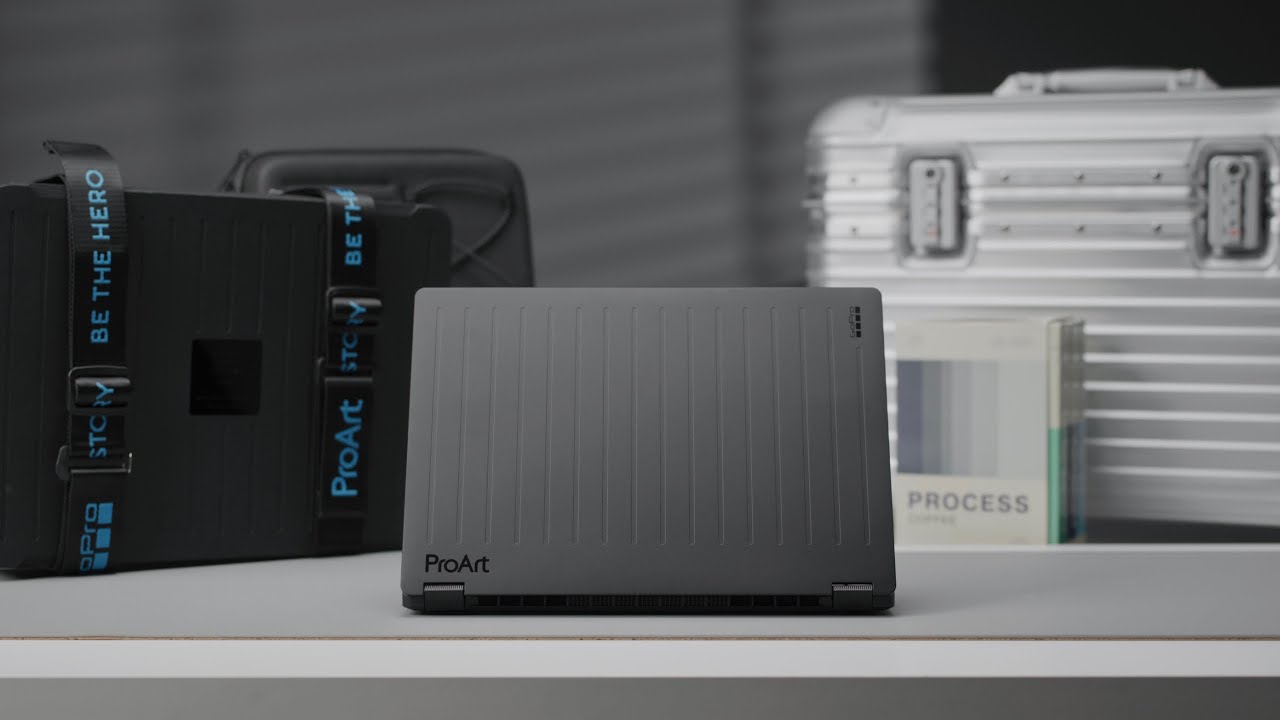
aluminum engraved horizontal lines across the lid and the sides replicating the design that you see on the latest GoPros. If you guys see the products that I personally really like from Remova, for example, or just any wood slided item from Bang and Olivesson, even in my interior design, you guys know that I love fine vertical lines. And in this case, it is almost like a dream collaboration of a computer when it comes to that design perspective. I mean, not only do the horizontal lines on the back look really good, but even on the edge, I feel like it adds a good touch to it. Maybe a nice texture. And I feel like with laptops nowadays, having a combination of simplicity and some texture really is the way to go. And I mean, if you guys take a look at this, it just looks absolutely beautiful. and it’s built in that stealth black identity that the Pro Art lineup has seemed to carry for quite a while now. Throughout the design, you’re also going to notice some cyan elements to it. And in this case, you have the subtle branding of Pro Art on the bottom here and GoPro along the side. And I think whether you are a GoPro fan or not, this is really something that you can appreciate. The laptop itself weighs in at 1.39 kg.
Specifications
And I think for a lot of people, the most interesting element is that it features 128 GB of unified memory. There isn’t any sort of specs that you can pick with these limited editions. It comes with one model and one spec, and that features the AMD Ryzen AI Max Plus 395, which is a 50 tops NPU, and it has the AMD XDNA Radeon Prograde graphics. And as I mentioned, it is 128 gigabytes of unified memory paired with one terabyte of internal storage. And for a computer that is nice and light, I just see this as being like an adventure companion for any creator out there who just wants to have a laptop in the field to edit, publish, and review your footage. When it comes to the display though, there are some interesting elements about this.
Display
It is a 3K OLED display that is 13 in. And I feel like nowadays we see laptops come in 14-in and 16-in options, but 13 in is one that is very portable, and it’s definitely noticeably smaller than some of my other laptops. And it still has a relatively high resolution of 2880 by,800 that gives you quite a bit of screen real estate if you are okay with the small form factor. It is a 3K Luminina OLED display and it has a 100% DCIP3 color gamut which is a must-have for the demographic of this computer. You want accurate colors for your photos and video editing, color grading. Being able to reference the work exactly the way that you intend it is a non-negotiable when it comes to a computer that is geared towards creatives. It also has over 1 billion colors, is a touchscreen, and has stylus support with 4,096 points. So, say you want to like mark certain areas, do revisions, draw something, you do have that option. The display itself is also able to fold 180° all the way back like this. So, if you want to use it like a tablet, use the touchcreen and all that, it is a twoin- one without it being a twoin one. But some of the drawbacks come in two areas. The brightness is peaked at about 500 nits, which is standard, but I feel like if you’re going to be using this laptop outside a lot, I definitely prefer laptops that are about 1,000 nits. But I also understand the constraints when it comes to the portable battery life that you could get with a display that does hit 1,000 nits. On top of that, it is only 60 Hz. And I feel like that’s an area where there will be some complaints. Some aspects of the display I think absolutely nailed it. It is a beautiful screen at the end of the day. It’s OLED. It’s got the infinite blacks. The colors really do pop out. And honestly, with any Asus laptop that I’ve tried out in the last few years, the display experience has always been a strong point. But I do see the brightness and the refresh rate being two major factors for creators out there who are not only used to a fast refresh rate, but at the same time, I think the brightness is an issue outdoors. So, on the topic of creator tools, I want to give a huge thanks to Art List for sponsoring this video. So, we’ve talked a lot about AI generated photo and video tools, and Art List is a platform that I have been using for many years to be able to get amazing royalty-free music for my videos. But one of the biggest problems that isn’t really to do with the platform, but just because it has gotten so popular, is that a lot of the royalty-free music that we use has already been used a million times before by many other great creators. And whenever there is a good track, you just feel like you’ve heard it somewhere before. Where AI generated music comes in is that you’re able to create studio quality commercial ready music in multiple genres with LIIA 3 Pro by Google. And it’s all inside the AI toolkit. You can either text to describe the type of music you’re looking for, the pace, the dynamics, as well as the genre or the feel. Or you can actually use images to get it to tell the story for you. By adding screen grabs from your video, for example, and by adding 10 images, it will help you generate something. So here is an example. This is good for social media commercials and Artless sound is another step that you can add that allows it to refine the sound that has been created to Artless signature professional production style, ensuring that every generated track meets studio industry quality. There are so many other great tools from Artless AI Creator Toolkit, but this is one that I feel like can be tangibly applied to our content right now in this video. So, if you guys want to go ahead and check it out for yourself, as well as the whole collection of Artless AI tools, make sure you visit their site, see the plan that works the best for you, and I’m going to drop a link in the description section below. And a huge thanks to Artless for sponsoring this video. As I mentioned with the processor, it is the AMD Ryzen AI Max Plus 395 with the
Performance
integrated prograde graphics. And I think the whole intention behind this laptop was to be a portable powerhouse. Something that is relatively small and easy to carry around, is beautiful, well-built, and rugged, but is able to allow you to do your work as you intend it. And with the actual performance aspect, it is interesting because you’re able to actually change the allocation of how much unified memory is sent to whether it’s the CPU or the GPU. And it actually lets you allocate up to 96 GB specifically for the built-in graphics. And that is going to be very important. I think for those who are doing like video rendering, color grading, you do want to utilize as much of that unified memory towards graphic specific tasks as possible, but I’ve also seen this type of architecture be quite popular amongst AI testing as well. On the topic of GoPro, there’s actually a hotkey that launches the GoPro player that seamlessly previews
GoPro Collaboration
360° footage and allows you to do quick editing on one tap, while Story Cube handles GoPro cloud import and asset sorting. And every laptop also includes 12 months of the GoPro subscription. In the past on our team, we have used GoPros for FPV, for example, and having to stabilize that footage or looking through the 360° footage. It is nice that this partnership has formed a performance alliance when it comes to giving you tangible improvements for using those apps.
Keyboard / Trackpad
When it comes to the keyboard and trackpad, I also found it to be quite nice. I mean, everything is nicely laid out. There’s no flex thanks to the unibody design on the keyboard. And when it comes to the trackpad, they’ve utilized every inch of space possible. And you also have the dial pad and the indicator is in a cyan color. This allows you to do like precision work, whether it’s scrolling through different dials, depending on the app. And through the ASUS ProArt software, you’re able to customize what the dial pad does for you in particular. As for the ports, you have two USB 4 Gen, 3
IO / Ports
Type-C ports, as well as a USB 3 Gen 2 type A, an HDMI 2.1 port, and a micro SD 4.0 card reader. I do wish it was a full-size SD card. And even though I understand GoPros use micro SDs, I feel like to be applicable for more creators, a full-size SD card would have made more sense. When it comes to the thermals though, this computer also performs surprisingly quiet and cool from my experience.
Battery Life
Even though smaller laptops suffer from a thermal standpoint a little bit more, the way the architecture of the chip is designed as well as a unified memory and also the large vents that are cut out on the side and on the bottom, I really didn’t experience any issues at all when it came to overheating. As for the battery life, this is where the 13-in size does seem to show a little bit more. I would say in terms of full-on usage, if you were doing like video editing, photo editing, have a couple things open, you should probably expect to get just about 3 hours of battery life. For the most part, I do like to keep the computers plugged in, even if I’m on the go. I also have a large anchor power bank, and it does have a 200 W power adapter that does connect directly through the DC port as opposed to relying on USB type-C to be able to charge your laptop pretty quickly. But the battery life is not a strong point. But if you are doing like performance work like I was testing it, then the battery life is not going to be the best that you’re going to experience. But I did expect that for a 13-in laptop with these specs. At the end of the day, I would say this
Overall Thoughts + Outro
laptop does suit a specific niche, and the niche that it’s set out to please is going to be pretty happy with it. And in fact, when I was on a recent trip, I saw Linus TechTips using this as his main computer. It’s a computer that is beautiful, durable, has the latest and greatest unified memory specs up to 128 GB, which is quite significant, and can serve as a main computer for many creators out there. On top of that, it has a good display, great port selection, and aside from a few different things here and there that I would have liked to have seen, I mean, I think somebody who is looking for the spec criteria, but most importantly, portable power is going to have a good experience. It does come in at $3,000, which is quite a bit of money, but at the end of the day, if this is the spec that you are looking for, you don’t really have to make a decision in terms of specking it out because it has been decided already. I also feel like the design, in my opinion, is probably one of the most beautiful I have seen on any laptop, even though it is subtle and simple. If you guys enjoy this video, make sure you go ahead and drop a like, subscribe to the channel, and I’ll see you all in the next one.